


Freedom Trail Boston Guide
4.655.00 Reviews
App Specs
- Version
- 38.0
- Updated On
- License
- Free
- Downloads
- 50,000+
- Developer
- Action Tour Guide LLC
- Categories
- Travel & Local
- Platform
- Android
Screenshots


 Analysis by AppCompare
When I explore a historic city, I want enough context to understand what I’m seeing without turning every stop into a research project. Freedom Trail Boston Guide is built for that kind of visit: it pairs a self-guided route through Boston with location-based history, so I can look around, choose my pace, and still have a story to follow. It’s a travel app from Action Tour Guide LLC, and its focus is specific enough to be useful rather than trying to cover every kind of Boston outing.
A simple way to start the walk
My baseline workflow would be to get the app ready before leaving the hotel or café, then use the route as a guide rather than a strict schedule. At a stop, I can check the map, listen or read, and decide whether I want to linger or move on. That approach suits the Freedom Trail especially well: the point is not simply to reach the next landmark, but to notice how the places connect.
The app is free to download, and it has a 4.6 average from around 380 ratings, with over 50,000 installs. It is rated for Everyone, which makes it a reasonable option for families planning a shared walk, although younger children may enjoy the stories more if an adult helps connect them to what is physically in front of them. Optional in-app purchases range from $4.99 to $89.99 per item, so I would check what is included in any purchase before treating the free download as a complete tour.
A Handy Companion
First things first, the app is super easy to download and set up. I mean, who wants to fuss around with complicated instructions when you could be out exploring? Once you’ve got it running, the Freedom Trail Boston Guide really shines. It's got this user-friendly interface that makes navigating a breeze, even if you're not the most tech-savvy person around.
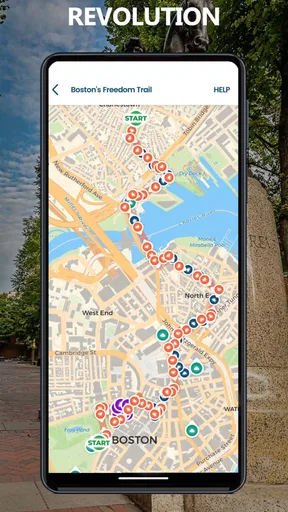
What's great is that the app doesn't just dump a load of information on you. It's thoughtfully organized, with interactive maps and detailed descriptions of each site on the trail. You can literally tap on a location and get a full rundown of its history. It’s like having a history buff buddy right there with you!
Settings and preparation worth checking
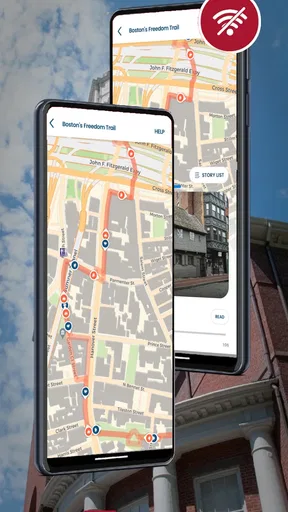
Before setting off, I’d make sure the route and any audio I plan to use are ready while I have a dependable connection. Offline audio is useful once I’m walking, but preparing in advance is still the less stressful habit: it avoids stopping on a busy sidewalk to troubleshoot or relying on mobile data at every turn. I’d also bring earbuds only if I can still hear street traffic and people around me; Boston streets are active, and safe awareness matters more than catching every sentence.
The app’s current version is 38.0 and it requires Android 9 or later. If I were travelling with someone using an older Android device, I’d check compatibility before making this the group’s only navigation plan. More generally, I’d keep a charged phone and a paper or offline map as a backup. GPS is helpful, but a guided walk is much more pleasant when a low battery or a momentary location wobble doesn’t dictate the day.
Worth Reading Before You Choose

Flipboard Shows What News Apps Must Do Beyond the Feed

Switching to Android Auto Means Rethinking Your Driving Routine

Google Calendar Makes a Crowded Week Easier to Manage

Ludo King Makes the Most of the Minutes Between Plans

Baby Panda World Brings Quick Play to Modern Phones, but Its Game Library Feels Busy

ESPN’s Live Game View Makes Following Close Games Easier
Features That Stand Out
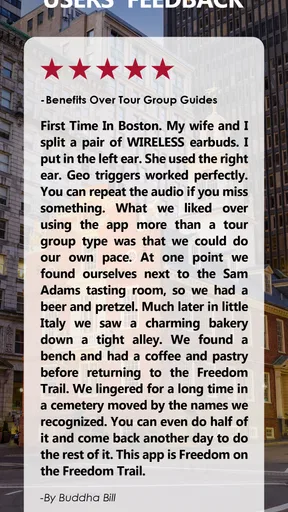
One of my favorite features is the audio tours. Seriously, you just pop in your earbuds, hit play, and let the app guide you. The narrators are engaging, and it feels less like a lecture and more like storytelling. Plus, the audio is available offline, a total lifesaver when you’re trying to save on data.
The app also includes fun facts and trivia that make each stop on the trail come alive. For instance, did you know about the secret messages hidden in some of Boston's oldest buildings? You’ll find all these nuggets of knowledge peppered throughout the app, which keeps the tour exciting and fresh.
Faster habits for a more flexible visit
I wouldn’t try to listen to every detail while walking between stops. A better rhythm is to use the map to orient myself, start the relevant story once I’m safely out of the flow of foot traffic, and pause when a site deserves a closer look. That small habit turns the phone from something I’m constantly checking into a guide I consult at natural breaks.
For a realistic half-day outing, I might begin with a coffee, open the route, and agree with a friend that we’ll stop whenever a story catches our attention rather than racing to finish. If the weather turns or we get hungry, we can shorten the walk and pick it back up later. The practical strength here is having context and route guidance together; the trade-off is that a phone-led tour still asks you to manage your own timing, breaks, and attention.
Planning Your Adventure
Another cool aspect is the itinerary planner. You can customize your own trail, deciding which spots to visit based on your interests and time constraints. The app even suggests nearby attractions, so you can make the most out of your visit. It's like having a local friend who knows all the best spots to hit up.
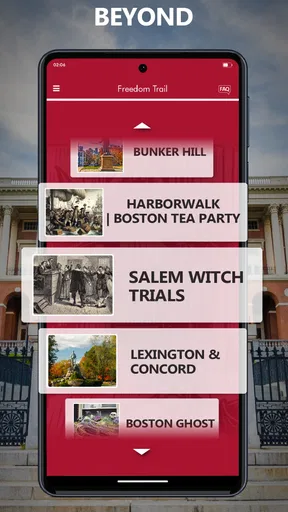
And for those who like a bit of structure, there are pre-set itineraries that cater to different interests, like a focus on architecture or revolutionary history. It's a nice touch for those days when you just want to follow a path laid out for you.
Where it fits among other ways to tour
Compared with a general maps app, this guide is more focused on the meaning of the trail’s stops; ordinary navigation can get me from one place to another, but it usually leaves the historical interpretation to me. Compared with a live walking tour, the app offers more control over pace and pauses, while a human guide can respond to questions and the mood of a group in real time. I’d choose this app for an independent visit, and a person-led tour if conversation and spontaneous explanations are the main reason I’m going.
It is also not the best choice for someone who wants a broad Boston itinerary built around food, shopping, or neighborhoods beyond the Freedom Trail. The narrow focus is a strength when the trail is the day’s priority, but a general city guide may be more useful for planning a whole weekend. And if I’m travelling with people who prefer not to use phones while sightseeing, I’d treat this as optional background rather than the group’s central plan.
Limits to keep in mind
A self-guided format leaves some decisions to me: when to pause, how long to spend at each place, and how much audio to hear. That freedom is welcome, but it can make the visit feel less cohesive if I jump around without checking where the next stop fits. I’d follow one itinerary first, then make detours when there’s a clear reason, rather than trying to optimize every minute.
There is also a difference between having offline audio and having every part of a trip work without preparation. I would not assume that maps, updates, or every piece of content will behave identically without a connection. Before setting out, I’d open the material I plan to use and confirm that it is ready. The app’s optional purchases are another point to consider: if I only want basic orientation, I’d explore the free experience first and decide whether an upgrade matches the way I actually tour.
Planning Your Adventure
Another cool aspect is the itinerary planner. You can customize your own trail, deciding which spots to visit based on your interests and time constraints. The app even suggests nearby attractions, so you can make the most out of your visit. It's like having a local friend who knows all the best spots to hit up.
And for those who like a bit of structure, there are pre-set itineraries that cater to different interests, like a focus on architecture or revolutionary history. It's a nice touch for those days when you just want to follow a path laid out for you.
What I’d want to know before downloading
If you’re wondering whether you need to pay before trying it, the app itself is free to download, with in-app purchases available. I’d start by checking what the free portion lets me do, then decide whether any paid content is worthwhile for my planned route. If you’re asking whether it works for a short visit, a flexible self-guided walk can suit a limited schedule, but I’d choose a compact route and avoid expecting to cover every stop at leisure.
For visitors concerned about going offline, the audio is available offline, which is a useful advantage for data-conscious travel. I’d still prepare before leaving a connection and avoid assuming that every app component is offline-ready. And if the question is whether it replaces a guidebook, it can provide a convenient on-the-street companion, but a printed map or a human guide may be better for people who want a phone-free walk or live answers.
Wrapping It Up
All in all, the Freedom Trail Boston Guide is a must-have if you're heading to Boston. It’s informative, easy to use, and genuinely enhances your experience of the city. Whether you're a history buff or a casual tourist, this app provides a personalized tour that you'll remember long after you've left Boston. So, go ahead, download it, and let your adventure begin!
My verdict after weighing the trade-offs
I’d recommend it to someone who wants the Freedom Trail to feel like more than a sequence of landmarks, especially if they value the option to explore without joining a fixed group. Its stories, map-based orientation, and offline audio make a practical combination for a walking day. The best results come from a little preparation and a relaxed pace, not from treating the app as an authority that must dictate every turn.
I’d skip it, or use it only as a supplement, if I wanted a live guide, a comprehensive city planner, or a completely screen-free experience. For everyone else, it is a focused tool with a clear purpose. I’d download it before the walk, choose an itinerary that matches my interests, and let curiosity—not the urge to finish the route—decide when to stop.
Pros
- Comprehensive historical insights.
- User-friendly navigation interface.
- Offline maps available.
- Regular updates with new content.
- Supports multiple languages.
Cons
- Limited customization options.
- In-app ads can be intrusive.
- Requires large storage space.
- Occasional GPS inaccuracies.
- No social media sharing features.
FAQs for Freedom Trail Boston Guide
What is the Freedom Trail Boston Guide app?
The Freedom Trail Boston Guide app is a comprehensive digital companion designed to enhance your exploration of Boston's historic Freedom Trail. It provides detailed maps, historical insights, and audio guides, allowing users to experience the trail at their own pace while learning about the significant landmarks and events in American history.
Is the Freedom Trail Boston Guide app available offline?
Yes, the app offers offline access to maps and key information about the Freedom Trail. This feature is particularly useful for travelers who may not have consistent internet access. You can download the necessary data before starting your tour to ensure a seamless experience without relying on mobile data.
How user-friendly is the Freedom Trail Boston Guide app?
The app is designed with user-friendliness in mind, featuring an intuitive interface that makes it easy to navigate. Whether you're tech-savvy or a novice, the app's layout ensures you can access maps, audio guides, and historical facts with minimal hassle, enhancing your tour of Boston's iconic sites.
What unique features does the Freedom Trail Boston Guide app offer?
The app includes unique features such as interactive maps, GPS-based navigation, and immersive audio guides narrated by historians. These features not only enrich your understanding of each site but also provide a flexible, self-guided experience tailored to your interests and schedule.
Is the Freedom Trail Boston Guide app suitable for families?
Yes, the app is family-friendly and provides engaging content suitable for all ages. It includes fun facts and interactive elements designed to captivate younger audiences, making it an excellent educational tool for families exploring the historical richness of Boston together.


